PLAN IT

Figure out what you need to do
Firstly, the idea of documenting something is far easier when you are actively trying something. Don’t wait until the task is finished, since you will forget a lot of what you’ve done. Another great way to start is to test some existing documentation, no matter how incomplete it may be. The existence of the document implies that it is important to someone.
Here are some ideas of where to start:
- A task you need to accomplish repeatedly.
- A task that you are feeling is more difficult or involved than you originally thought.
- Something the team always asks you to help with.
- Anything involving “critical” data.
- Compliance requirements for the organization.
If this hasn’t sparked any inspiration here are some specific examples I’ve done in the past:
- Administrator setup and troubleshooting guide for a security tool.
- Step by step guide for IT personnel to collect a forensic image of an internal system.
- How and where to update an identified indicator of compromise (IOC) in all security tools within the environment.
- Checklist of key artifacts to analyze for MacOS forensics.
Look for existing documentation
Internal
Ask around and see if there is any documentation that may need to be refreshed. Look through your internal KnowledgeBase (KB) for tips others have written in the past. Look through the vendor provided guides and determine if they can be rewritten to be more useful to your organization.
External
Google if anyone has provided a playbook or guide around a process/tool you perform. Vendor websites often contain guides or blogs on specific use cases. Ask the community! Tweet, toot, or post if anyone has reference material, they are willing to share.
Create a high level outline
Open up a document and start writing. Don’t worry about getting into specific steps. Just have a nice outline of what you will need to do. Try to group the individual tasks so someone who is looking at this for the first time, knows what you are trying to do.
Example Outline

WRITE AS YOU GO

Do the task and take notes in your outline
Of course, you will need to actually perform the task. However, as you are doing it, keep a notepad or even the outline you just made open to take notes as you go. Sometimes you may not know what eactly to write down, so here’s a few things to keep in mind:
- How does someone access the tools needed to perform the task?
- Who should know how to do this?
- Is there any prerequisite knowledge someone needs to perform this?
- GUI, Terminal, Physical?
- If you have a shortcut, what is the steps if the shortcut doesn’t work?
- What was annoying, tedious or difficult?
Fill in your outline with your notes and look for gaps
As you fill in details, you will likely find more and more gaps. Make sure you are setting aside time to accommodate for this. A lot of times, you may start to document but then do not follow through the entire process and are missing key details.
PRO TIP: Bring a friend! Having someone take notes as you perform the task or vice versa makes your life so much easier!

MAKE IT PRESENTABLE

Clean it up and make it pretty
Here’s the honest truth, if something looks ugly no one will read it. What do I mean by ugly? Here are a few things you want to avoid and help clean up your documents:
- Avoid large blocks of text.
- Use bullets and headers to break things into sections.
- Use “normal” language try to avoid jargon and at least define it if you do.
- Add some color, use your organization branding colors and logos to give it a professional look.
- Even the default Word or Google Docs header styles will help make it look nice.
- Highlight and bold key pieces of information.
- Don’t make everything look “exactly” the same, variety helps keep attention.
- The less words the better. Summarize up top and more details explanation below.
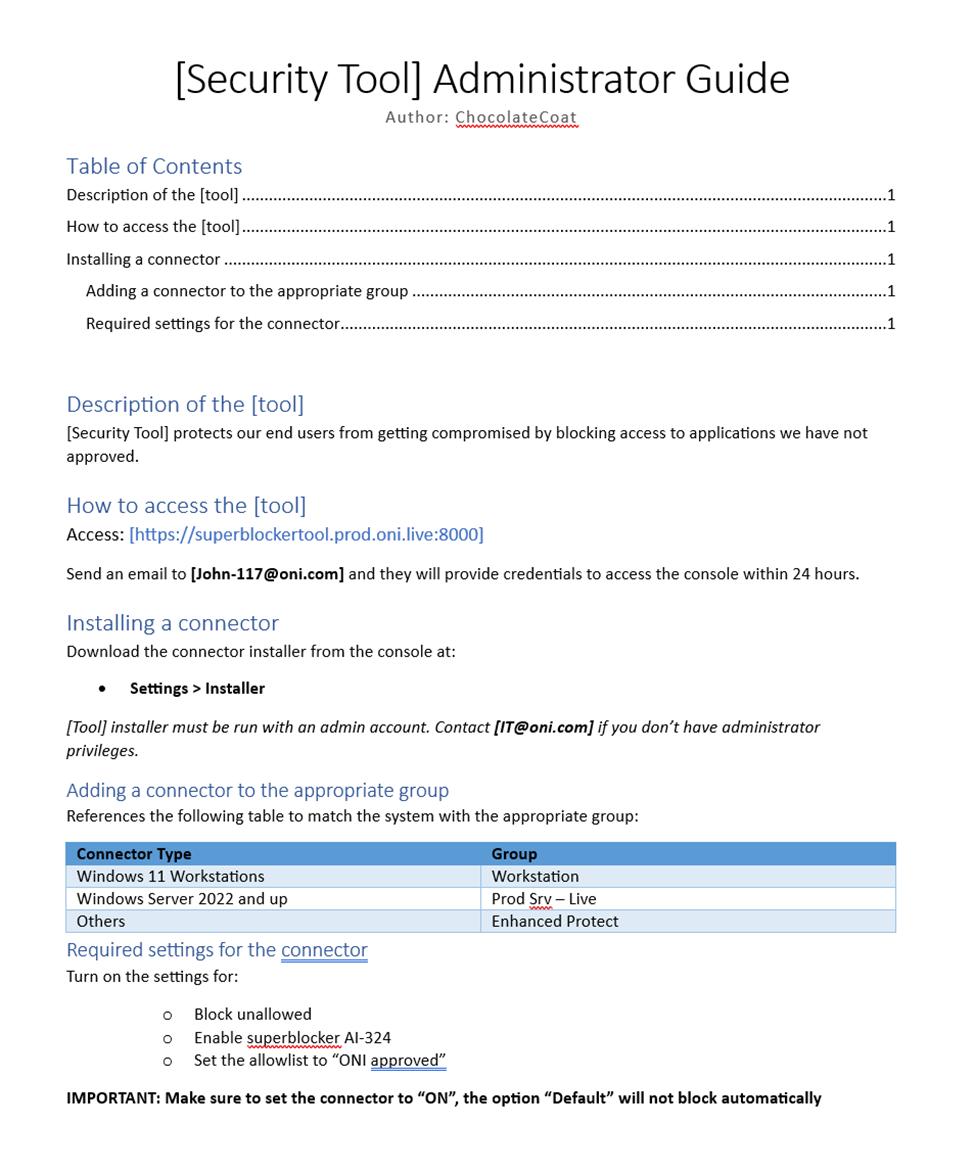
Upload it somewhere where all your team members can use it
Nice document! Now make sure that you keep it somewhere everyone can access. Avoid just emailing or messaging it to folks. Have it stored somewhere where you can easily send a link. Few examples below:
- Internal KnowledgeBase
- SharePoint/OneDrive
- Google Drive
- Confluence
- ServiceNow
- Internal Shared Drive
Wherever you keep it, make sure it’s accessible and easy to find. Ideally, you can categorize and apply tags to documents to make searching a breeze.
NOTE: If you are documenting critical data, make sure you are taking extra care to only allow access to folks who are authorized.
Announce it to the team!
Don’t just keep it to yourself! Share it with anyone who it applies to. I will stress, make sure you are sharing with the proper audience. As cool as your fancy new document is, it will not be applicable to everyone. So keep it with the groups that need it and ask folks to share it with anyone else.
Please do not just send the link and call it a day, no one has time for that. Instead:
- Include the link
- The name of the document
- What it is and why you made it
- Ask folks to review & test it out
CONCLUSION
Good job, you are doing the hard part that no one typically wants to do. However, I promise you if you know how to document a process that you will become an expert of it.
As always let me know whatever feedback you may have and take care of each other.
Terryn Valikodath
Twitter: @CyberCoat
Mastodon: @ChocolateCoat@infosec.exchange
LinkedIn: terrynvalikodath
 ChocolateCoat4N6
Pingback: Week 26 – 2023 – This Week In 4n6